
An ai video generator sounds like a shortcut, but the better framing is: a force multiplier for lean marketing teams who already know what they want to say. InVideo AI is one of the most capable tools in this space right now, and this guide walks you through what it actually does, how to set up a working first session, where its limits show up, and how to decide whether it belongs in your content stack.
According to OpenAI’s published case study on InVideo AI, users of the platform are spending ten times less time on production, cutting what was once a full day of work down to thirty minutes or less. That claim is worth testing critically, but the architecture behind it is credible: InVideo AI runs on a multi-agent system using OpenAI o3 as the creative planner, GPT-4.1 to structure the script, and gpt-image-1 to generate background visuals and branded assets. This is not a wrapper around a basic template engine.
What an AI Video Generator Actually Does
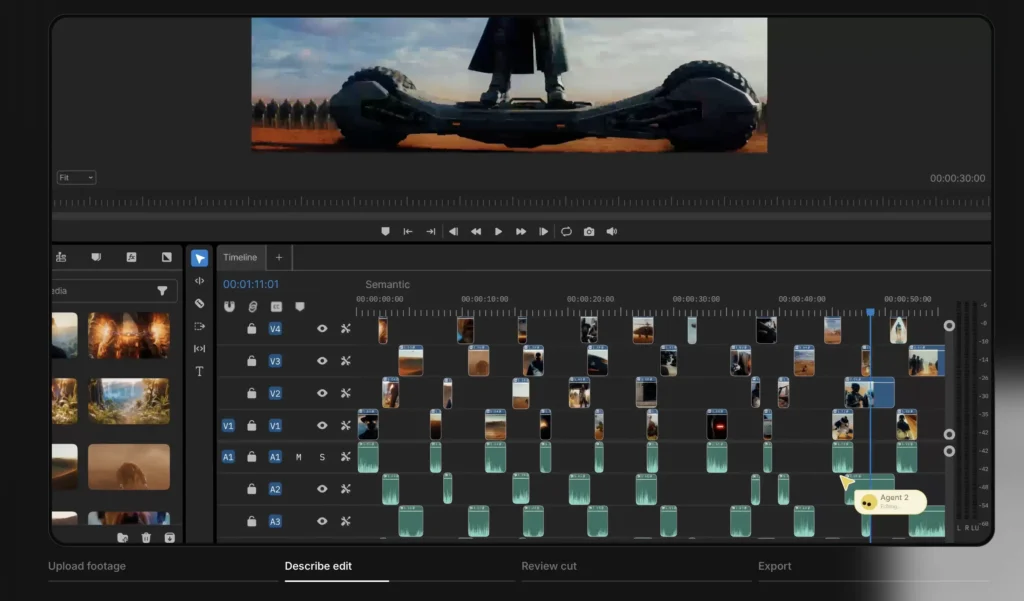
At its core, an ai video generator takes a text input and returns a watchable video. The specifics matter more than the category label.
InVideo AI accepts a plain-language prompt or a longer written brief, then works through the production steps automatically: writing a script, selecting or generating visuals, adding a voiceover, syncing music, and assembling a timeline. The output is a complete draft, not a blank canvas. You enter something like “Create a 60-second explainer for a SaaS project management tool targeting remote teams” and receive a structured video with narration, scene cuts, and text overlays within a few minutes.
The key technical distinction is the multi-agent architecture. Different AI models handle different production tasks in sequence, which means the planner (o3) can reason about the target platform and audience before the script writer (GPT-4.1) ever types a word. A prompt specifying “optimise this hook for TikTok” will produce a different pacing and visual style than the same content formatted for a LinkedIn carousel video. That platform-awareness is one of the things that separates InVideo AI from simpler template tools.
InVideo AI also provides access to over 16 million stock media assets, searchable through its own AI, plus AI-generated backgrounds and branded visuals through gpt-image-1. Voice cloning is available on higher-tier plans, so you can maintain a consistent narrator identity across a content series without re-recording anything.
Getting Started: Your First Video in Under 30 Minutes
The fastest way to understand InVideo AI is to run a real prompt against a real marketing brief. Here is a repeatable workflow for a first session.
- Sign up and select a plan. The free tier exists and lets you explore the interface, but exports carry watermarks and generation credits are limited. For actual marketing output, the paid plans run roughly $20 to $30 per month when billed annually for the individual tier. A business tier with team collaboration and higher output limits is available at the higher end of the range. You can check current InVideo AI pricing and start a trial here.
- Write a specific prompt. Vague prompts produce vague videos. Include: the format (ad, explainer, social reel), the target audience, the desired tone, the platform, and any brand constraints. Example: “Create a 45-second Instagram Reel promoting a free trial of a project management app, upbeat tone, targeting startup founders aged 25 to 40, include a clear call to action at the end.”
- Review the first draft scene by scene. InVideo AI breaks the generated video into labelled scenes. You can accept, regenerate, or manually edit each one. Do not skip this step. The AI will occasionally select visuals that are technically relevant but tonally wrong. A few minutes of scene-level review catches 80% of the issues.
- Adjust the voiceover and music. The default AI voice is functional but generic. Browse the voice library and test two or three alternatives. If your brand has a distinct verbal identity, the voice cloning feature is worth exploring once you are past the free tier.
- Export and test. Download the video without a watermark on a paid plan and run it against your usual content benchmarks before committing to a full series.
If you are already running AI workflows across other parts of your marketing stack, this prompt-to-draft loop will feel familiar. The main adjustment is learning which input details produce the best scene selection from the AI.
Core Use Cases for Marketing Teams
InVideo AI earns its place in a marketing workflow when volume and speed matter more than pixel-perfect custom production.
Short-Form Social Content
Generating Instagram Reels, TikToks, and YouTube Shorts from a brief is the most common use case. The platform understands aspect ratios, pacing norms, and hook structures for each format. A single campaign concept can be adapted into three platform-specific cuts in the time it would previously take to brief a video editor.
Explainer and Product Demo Videos
Text-to-video works well for explainers because the structure is predictable: problem, solution, how it works, call to action. InVideo AI handles this template reliably. The main watch-out is that screen recording and live demo footage still need to come from you. The AI cannot capture your product interface; it can only generate illustrative visuals around your narration.
Blog-to-Video Repurposing
Pasting a blog post or article into the prompt field and asking InVideo AI to generate a summary video is a fast content repurposing workflow. The output tends to compress well for social but loses nuance. Treat these as awareness-level assets, not detailed tutorials.
Ad Creative Variants
Testing different hooks, CTAs, or audience framings is where the volume capacity of an ai video generator pays off directly. Producing five hook variants for a paid social campaign costs almost nothing in time and lets you run a legitimate creative test without a production budget.
Honest Limits You Should Know Before Committing
InVideo AI has real constraints, and understanding them upfront saves frustration later.
- Credits deplete faster than expected. User reports note that the credit system can consume a large portion of monthly allocation on a single complex generation. Understand how credits map to video length and generation attempts before choosing a plan tier.
- Stock footage can feel generic. Even with 16 million assets available, a large user base accessing the same library means visual repetition is possible across unrelated brands. Custom asset uploads and the gpt-image-1 generated visuals reduce this risk, but do not eliminate it.
- AI voiceovers still have tells. For awareness content this is acceptable. For high-stakes brand videos or anything requiring emotional nuance, a human voiceover layered over the AI-assembled edit will consistently outperform a fully synthetic track.
- Complex narrative requires human direction. As Adobe’s guide to AI video creation notes, “AI video works best as a complementary creative tool” rather than a replacement for human creative direction. If the story requires emotional continuity, brand-specific tone, or subtle persuasion, the AI draft is a starting point, not a finished product.
- Internet dependency. InVideo AI is entirely cloud-based. Offline editing or slow connections create friction in a fast-turnaround workflow.
InVideo AI vs. Alternatives Worth Knowing
InVideo AI is a strong option for text-to-video generation, but it is not the only one. Here are the honest comparisons.
- Synthesia: Better suited when you need a consistent AI avatar presenter. Strong for training videos and internal comms. Less flexible for short-form social creative. Typically priced higher on a per-seat basis.
- Runway: More powerful for cinematic and generative footage. A better fit for creative directors who want fine-grained control over generated clips. Steeper learning curve than InVideo AI.
- Descript: Leads on transcript-based editing of recorded footage. If your team produces a lot of talking-head or interview video, Descript’s workflow beats InVideo AI’s text-to-video approach for that specific job.
- Canva Video: A viable free or low-cost alternative for simple social cuts. Lacks InVideo AI’s multi-agent generation depth but integrates tightly with existing Canva design workflows.
The practical question is not which tool is best in the abstract, but which tool fits your actual brief. InVideo AI’s free tier lets you test this directly before spending anything, which is the right way to evaluate any tool in this category.
Integrating InVideo AI Into a Content Operations Workflow
The teams that extract the most value from an ai video generator treat it as a production layer inside a broader content system, not as a standalone tool.
A practical integration looks like this: the content brief lives in your project management tool, the script draft comes from your existing copy workflow, and InVideo AI handles the visual assembly and audio generation. The editor reviews and approves at the scene level, then exports to the distribution platform. The AI removes the production bottleneck without removing the human judgment that keeps output on-brand.
For teams already building AI-assisted workflows, the handoff points matter. Treat the InVideo AI prompt as a brief artifact, not a throwaway input. Saving and iterating on prompts that produced good results is the fastest way to develop a reusable production template for your brand.
If you want to understand how this fits into a wider AI content operations setup, the frameworks covered in our AI Workflows section show how individual tools like InVideo AI connect into repeatable, scalable systems.
Pricing Summary and Who It Is For
InVideo AI operates on a freemium model. The free plan allows exploration with watermarked exports and limited generation credits. Paid plans for individuals run approximately $20 to $30 per month billed annually. Business and team tiers add collaboration features, higher generation limits, and expanded storage, typically in the $40 to $60 per month range on an annual commitment.
InVideo AI is a good fit for: solo content marketers producing social video at volume, small marketing teams without a dedicated video editor, growth marketers running creative tests on paid social, and agencies looking to add video deliverables without adding headcount.
It is a weaker fit for: production-intensive brand campaigns requiring cinematic footage, teams whose video is primarily live or interview-based, and anyone who needs a precise frame-level editing environment comparable to Premiere Pro or DaVinci Resolve.
Try InVideo AI on the free plan to validate whether the output quality meets your standards before committing to a subscription.
Frequently Asked Questions
Do I need any video editing experience to use InVideo AI?
No prior video editing experience is required. InVideo AI is designed around plain-language prompts and a scene-by-scene review interface. Most users can produce a complete first draft within their first session. That said, marketers who understand pacing, hooks, and platform norms will consistently get better outputs than those who do not, because better prompts produce better results.
How does the InVideo AI credit system work?
InVideo AI uses a credit-based model where each generation action, including video creation, voiceover synthesis, and in some cases even viewing completed outputs, consumes credits from your monthly allowance. The exact credit cost scales with video length and complexity. Review the specific credit allocation for your chosen plan before generating long-form content to avoid exhausting your monthly budget in a single session.
Can I use InVideo AI output for commercial purposes?
Yes, videos created on paid InVideo AI plans can be used commercially. Always verify the current terms of service for your specific plan tier, as licensing terms for AI-generated stock assets and voiceovers can differ from custom-uploaded content. When in doubt, review the platform’s terms and conditions directly before publishing commercial campaign material.
How does InVideo AI compare to hiring a freelance video editor?
For structured content types like social reels, explainers, and ad variants, InVideo AI is significantly faster and cheaper than a freelance edit. The trade-off is a lower ceiling on creative customisation and brand specificity. A practical approach for many teams is to use InVideo AI for first drafts and high-volume formats, then bring in a freelance editor for hero campaigns or brand-sensitive productions that require a higher standard of craft.
What video formats and aspect ratios does InVideo AI support?
InVideo AI supports the major social video formats including vertical 9:16 for Instagram Reels and TikTok, square 1:1 for feed posts, and landscape 16:9 for YouTube and presentations. The platform’s AI agents are aware of platform-specific norms and can optimise pacing and structure accordingly when you specify the target platform in your prompt.
Sources
- OpenAI: InVideo AI enables anyone with an idea to produce high-quality videos
- Adobe Firefly: The Complete Guide to AI Video Creation
