
Granola and Wispr Flow now overlap in an important way: both can capture meetings without a bot and turn conversations into useful notes. Wispr Flow is no longer just an AI dictation tool. Its new Notetaker adds meeting transcripts, summaries, speaker identification and AI questions about past discussions. Granola remains a meeting-first notepad with mature collaboration, templates and business integrations. For a lean marketing team, the decision now depends on how you work after the meeting, not simply whether you need notes or dictation.
Our practical recommendation: Start with Granola if your priority is organizing customer interviews, client calls and team knowledge into repeatable meeting workflows. Start with Wispr Flow if you want one subscription for both meeting notes and speaking emails, briefs, ad-copy ideas and AI prompts into other apps. Neither is automatically better at transcription accuracy: we have not run a controlled, same-meeting test.
Key Takeaways
- There is real feature overlap now: Granola and Wispr Flow both offer bot-free meeting transcription, AI-generated notes and meeting questions.
- Granola’s emphasis: meeting-centered workflows, handwritten/typed notes enriched by AI, shared knowledge, templates and integrations with tools such as HubSpot and Notion.
- Wispr Flow’s advantage: Notetaker sits alongside system-wide dictation, so the same product can help capture a client call and draft the follow-up email.
- Privacy deserves a separate check: Wispr Notetaker meeting audio and transcripts have different storage rules from dictation. Ask participants for consent before recording.
- Do not pay for both by default: trial each one on the same consented meeting workflow and score the quality of the resulting actions before considering a two-tool stack.
What Changed: Wispr Flow Now Has a Notetaker
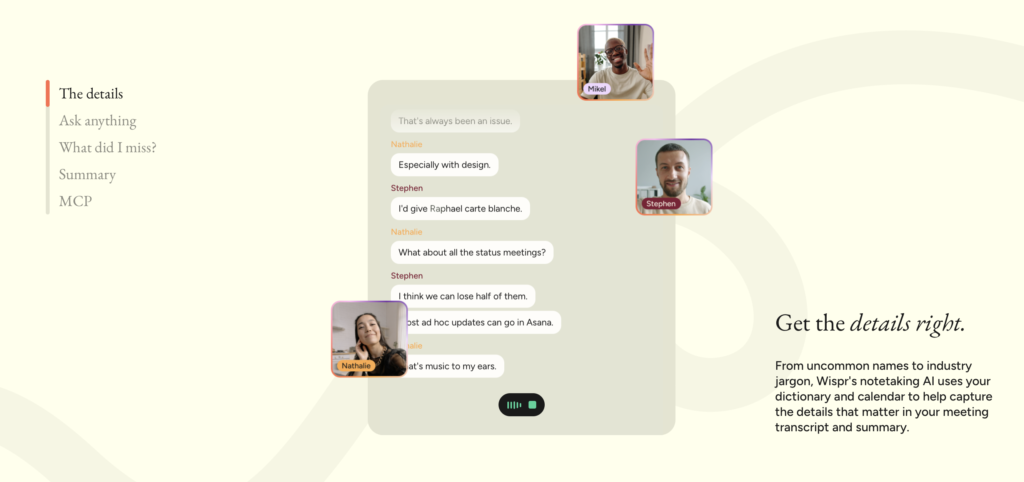
The old comparison, Granola for meetings, Wispr Flow for dictation, is outdated. Wispr Flow Notetaker is a dedicated feature for recording meetings on Mac and Windows. It captures microphone and system audio without adding a bot to a Zoom, Google Meet or Teams call. Users can follow a live transcript, write their own notes and receive an AI-generated meeting summary afterwards.
Wispr also advertises speaker identification, topic-organized summaries, decisions and next steps, an in-meeting catch-up question such as “What did I miss?”, and the ability to ask questions across prior meetings. The Notetaker can connect to Google and Outlook calendars, while its meeting information can be accessed by compatible AI tools through MCP. Availability depends on device, plan and account rollout.
The meaningful distinction is therefore no longer meeting notepad versus voice keyboard. It is specialist meeting workspace versus combined meeting recorder and everyday voice-writing tool.
Granola vs Wispr Flow: Meeting Features Compared
Granola: A meeting-first workspace
Granola combines a conversation transcript with the brief notes you type during a meeting. You can refine those notes with AI, apply templates, organize records into spaces and folders and ask questions across meetings. For a small agency or product-marketing team, those capabilities are useful when the meeting needs to become a reliable record for the rest of the team. Granola Business also lists advanced connections to Attio, Notion, Slack, HubSpot, Affinity and Zapier, plus an API and MCP access. See Granola’s product guide and pricing page.
Wispr Flow: Meeting notes plus everyday dictation
Wispr’s Notetaker now covers the core meeting capture task, including live transcription, AI summaries, searchable past discussions and sharing. In the same product, Wispr’s dictation feature helps users speak into almost any text field: an email to a client, an ad brief, a Slack update or a prompt for an AI assistant. This creates an appealing workflow for a solo marketer who moves repeatedly between calls, writing and analysis. However, a feature list is not evidence that its summary quality, collaboration experience or integration depth matches Granola for every team.
| Decision factor | Granola | Wispr Flow |
|---|---|---|
| Meeting recording | Yes, bot-free meeting notes | Yes, bot-free Notetaker on Mac/Windows |
| Live transcript and AI recap | Yes, AI meeting notes and chat | Yes, live transcript and AI summaries |
| Personal notes | Central to its note-enrichment workflow | Notes can be added alongside transcription |
| Ask questions about meetings | Within and across meetings | During and after meetings, including past meetings |
| Organizing team knowledge | Spaces, folders, shared notes and templates | Meeting hub and sharing; review team needs and access rules |
| Voice dictation into other apps | Not its primary purpose | Core product across desktop and mobile |
| Third-party workflow integrations | Business integrations, API and MCP | Meeting access through MCP; broad app support for dictation |
| Free offering | AI notes with limited meeting history | Limited meeting notetaking plus capped dictation |
| Paid entry | Business: $14/user/month | Pro: $15/user/month, or $12 billed annually |
Sources: Granola pricing and features and Wispr Flow pricing and features, checked October 12, 2026. These are vendor-stated capabilities, not independent quality scores.
How Each Tool Fits Marketing Workflows
1. Customer research and stakeholder interviews
Imagine interviewing five customers about a new pricing page. The output you need is not simply a transcript: it is an accurate list of objections, exact wording worth checking, unresolved questions and follow-up owners. Granola’s customizable notes and organized meeting archive make it a natural starting point. Wispr’s Notetaker can also capture and summarize those conversations, so the sensible comparison is which produces more verifiable evidence and fewer corrections on the same interview.
2. Agency calls and campaign planning
During a client status meeting, track budget decisions, creative deadlines and responsibility for next steps. Both tools can help extract a recap, but neither should be treated as the final source of truth for a budget change. Confirm figures and owners against the transcript and ask the client to approve material decisions. If your team already sends results into a CRM or shared workspace, Granola’s documented business integrations may be useful.
3. Meeting-to-execution for a solo marketer
This is where Wispr Flow’s combined product is interesting. Record a brainstorming session with Notetaker, review the decisions, then use dictation to speak a first draft of the email, creative brief or ChatGPT prompt that follows. It reduces switching between a meeting product and a separate voice-writing tool. For more examples of the writing side, see our guide to voice-to-text AI with Wispr Flow.
4. Sharing knowledge across a small team
For repeated customer interviews and cross-functional updates, look beyond the quality of a single summary. Test whether colleagues can find the relevant meeting, see the correct permissions, search across past conversations and turn an action into a task. Granola emphasizes shared folders, custom templates and business integrations. Wispr offers meeting sharing, search and MCP connections. The right fit depends on the team’s handoff process and governance needs—not the number of AI features listed on the website.
For a deeper look at a meeting-first workflow, read our guide to using Granola for AI meeting notes.
Recording Consent, Privacy and Retention
Bot-free does not mean consent-free. Because neither tool needs to join the call as a visible attendee, the user must still inform participants and obtain any recording or transcription permission required by law, client agreements and company policy. This matters especially for customer research, recruitment interviews and agency calls involving sensitive business information.
A correction to the older Wispr comparison: It is inaccurate to say all Wispr audio is discarded immediately and that meeting data is handled exactly like short dictation clips. Wispr’s Notetaker privacy documentation says uploaded meeting audio is generally retained for seven days after upload, with options or account-specific rules that can shorten this. Meeting transcripts remain unless a retention window expires or the meeting is deleted; titles, notes and AI summaries have separate retention. Notetaker uses cloud processing, and sharing a notes link can broaden who has access.
Granola’s own plan information describes user controls for opting out of model training and organization-wide retention/sharing features on Enterprise. Review each provider’s current privacy policy and trust documentation rather than assuming that a comparable meeting experience means identical storage, training or access rules.
If a connection drops during a Wispr meeting, Wispr says recording can continue locally and be transcribed when the connection returns. That is different from full offline live transcription. For confidential calls, confirm consent, restrict sharing, check the retention setting and manually review the summary before forwarding it.
Pricing and Plan Limits
Granola: Basic is free with limited meeting history. Business is listed at $14 per user per month and adds unlimited notes/history and stronger integrations. Enterprise is listed at $35 per user per month with expanded administration and controls. See current Granola pricing.
Wispr Flow: Free includes limited Notetaker access and dictation capped at 2,000 words per week on desktop and 1,000 on mobile. Pro is listed at $15 per user per month, or $12 per month billed annually, with unlimited dictation, higher meeting limits and longer Notetaker history. Wispr lists higher-priced organizational options and unlimited Notetaker arrangements separately; do not assume unlimited meeting recording is included in every standard Pro account. Feature access may be gradual. See current Wispr Flow pricing and FAQs.
For a team of five, Granola Business at the listed monthly price would be $70 per month; five Wispr Pro subscriptions would be $75 per month on monthly billing, or $60 per month equivalent when billed annually. Those figures do not establish equal meeting allowances, feature access or taxes, so compare actual usage before budgeting.
Which Should a Marketing Team Choose?
Choose Granola first if the main problem is structured meeting knowledge: recurring interviews, client discussions, standardized templates, searchable shared records, or downstream CRM handoffs.
Choose Wispr Flow first if you want meeting notes and a voice-writing tool for briefs, emails, campaign updates and AI prompts. It may offer better subscription consolidation for a solo marketer or small team that values both jobs.
Use both only when a trial exposes a real gap. Paying for two meeting recorders without testing may create duplicate notes, inconsistent access permissions and unnecessary expense. Here is a simple trial: obtain consent; record the same type of meeting with each tool on separate occasions; compare speaker attribution, named decisions, missed figures, action-item owners, edit time, sharing controls and cost; then choose the tool that requires less correction in your own workflow.
Bottom line: The two products are now genuine alternatives for AI meeting notes, but Wispr Flow also handles everyday dictation. For marketers, the best decision is based on the complete workflow from meeting → verified takeaways → action, not product labels or marketing claims.
Frequently Asked Questions
Can Wispr Flow replace Granola for meeting notes?
Potentially, yes. Wispr Notetaker now records meetings, creates transcripts and summaries, identifies speakers and supports questions about past meetings. Whether it can replace Granola for your team depends on your needs for templates, shared knowledge, integrations, retention and accuracy. Compare them on real, consented meetings before canceling either product.
Does Wispr Flow Notetaker work on mobile?
As of October 12, 2026, Wispr lists Notetaker recording on Mac and Windows, while its dictation works on desktop and mobile. Check Wispr’s compatibility notes for changes.
Do I need to notify participants when recording with either tool?
Yes—follow the notice and consent requirements that apply to your meeting, location, employer and client. A bot-free recorder does not automatically notify everyone. See Wispr’s consent guidance.
Should I subscribe to both Granola and Wispr Flow?
Not automatically. Trial one meeting solution first. A two-tool stack only makes sense if Granola’s meeting workflows and Wispr’s dictation together provide a measurable benefit you cannot get with a simpler setup.
