

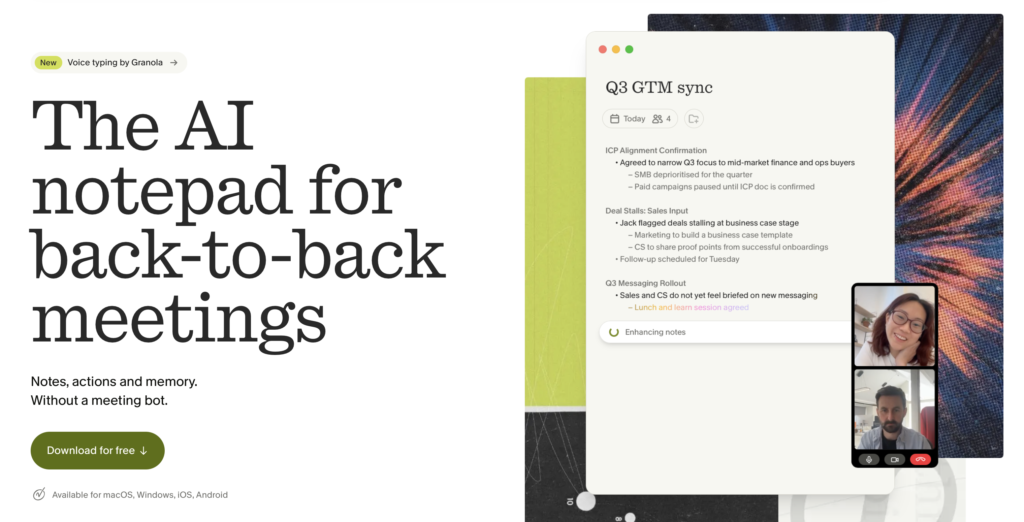
Choosing between Granola and Fathom comes down to whether your growth workflow requires an interactive, human-steered notepad or an automated, video-recorded meeting intelligence hub. Granola functions as an unobtrusive desktop notepad that enriches your personal shorthand using local audio transcription, deleting raw audio immediately after processing. Fathom acts as an automated recording engine that logs full video, transcribes dialogue across multiple web conferencing platforms, generates structured sales summaries, and synchronizes detailed call records directly to your CRM. Neither tool replaces thoughtful human qualification, but each serves distinctly different operational requirements for client-facing teams.
Key Takeaways
- Core Architectural Difference: Granola captures local device and system audio without deploying a virtual attendee bot, whereas Fathom records full video and audio across Zoom, Google Meet, Teams, and Slack Huddles (with bot-free audio mode available on macOS 14.2+).
- Downstream Follow-Up: Fathom automatically drafts ready-to-send follow-up emails and structured sales methodology notes (such as MEDDPICC or BANT), while Granola enhances your typed talking points to produce polished client summaries.
- Data Retention and Privacy: Granola discards raw audio recordings immediately after generating text transcripts, making it ideal for strict compliance environments, whereas Fathom retains full video replays and searchable transcript libraries.
- CRM Architecture: Fathom offers deep native two-way sync for HubSpot, Salesforce, and Close, while Granola connects natively to HubSpot, Attio, and Affinity, routing Salesforce updates primarily through Zapier or webhooks.
Disclosure: Some links in this article are affiliate links. We may earn a commission at no extra cost to you; it does not affect our evaluation.
Core Architecture: Notepad vs. Call Recorder
To evaluate these platforms fairly, growth marketers and agency founders must recognize that they solve different stages of the client meeting workflow. If you have explored our breakdown of Granola for solo founders, you know that the platform treats the user as the primary editor. You type shorthand observations during the conversation, and Granola maps those bullets against the background transcript to produce structured, coherent notes.
Fathom takes an opposite, fully automated approach. It is built as a complete meeting intelligence platform. It enters calls to record high-resolution video and audio, indexes every spoken word with precise speaker attribution, and extracts action items without requiring the host to type a single keystroke. When deciding between a passive dictation tool like Granola vs Wispr Flow or a full meeting intelligence platform, your decision rests on whether your follow-up requires video proof and CRM automation or fast personal synthesis.
Recording Mechanics and Bot Presence
Client perception is a critical operational variable in high-ticket consulting, agency sales, and consultative discovery. The presence of an external recording bot joining a video call roster can alter meeting dynamics, raise privacy inquiries, or violate internal vendor policies for enterprise buyers.
| Feature | Granola | Fathom |
|---|---|---|
| Meeting Bot Presence | Never joins meeting roster; captures system/mic audio locally | Traditional recording bot joins calls; bot-free mode on macOS 14.2+ |
| Platform Support | macOS, Windows, iOS, Android | Zoom, Google Meet, Microsoft Teams, Slack Huddles |
| Video Capture | No video; audio discarded post-transcription | Full HD video recording, clip creation, and video sharing |
| Language Support | Multi-language transcription via foundational LLMs | 38 languages supported for transcription and summaries |
| Audio Retention | Immediate deletion after transcription | Stored on secure cloud storage alongside video recordings |
According to Granola official release notes, Granola operates entirely without an attendee bot across macOS and Windows. It listens to incoming system audio and your outgoing microphone stream directly from your operating system. Once the transcript is generated and combined with your notes, the underlying audio is deleted. This provides an immediate compliance advantage when speaking with security-conscious clients who forbid third-party participant bots.
Conversely, documented in the Fathom Help Center, Fathom historically relied on an external participant bot joining Zoom, Google Meet, or Microsoft Teams. With the introduction of Fathom 3.0, macOS users running version 14.2 or higher can use bot-free recording across 20 languages. However, Windows users primarily still utilize the standard recording bot. The trade-off is functionality: Fathom preserves full video playback, synchronized timestamped transcripts, and shareable video snippets that sales leaders can use for deal coaching and handoffs.
Client Follow-Up and CRM Sync
In B2B pipeline management, speed to follow-up directly influences conversion rates and client retention. A meeting note tool must do more than record discussions; it must cleanly integrate downstream into your client relationship management system.
Fathom is purpose-built for sales execution. When a discovery call ends, Fathom automatically structures the discussion into popular sales frameworks, including MEDDPICC, BANT, and Sandler. It generates a pre-formatted follow-up email draft citing specific pain points mentioned by the client. Through verified native integrations, Fathom synchronizes call summaries, action items, and video links directly into contact and deal records across HubSpot, Salesforce, and Close. This automation eliminates manual data entry for multi-rep teams.
Granola approaches follow-up from a craftsman perspective. Because it enriches your handwritten notes with the audio transcript, the resulting summary captures personal context and internal shorthand that automated bots frequently miss. According to the Granola Integrations Directory, Granola provides native synchronization with HubSpot, Notion, Slack, Affinity, and Attio. However, connecting Granola to Salesforce requires routing through Zapier or webhooks. Granola also features a Model Context Protocol (MCP) server, allowing technical operators to query meeting archives via local AI assistants such as Claude Desktop.
Pricing and Plan Limits
Both platforms offer distinct entry points and commercial upgrade paths depending on team size and archival requirements.
| Plan Tier | Granola Pricing & Terms | Fathom Pricing & Terms |
|---|---|---|
| Free Tier | $0/month: Full note creation, limited to 30-day visible history | $0/month: Unlimited recordings, transcripts, and storage forever |
| Individual Paid Tier | Business: $14/user/month (unlimited history, CRM, Zapier, MCP) | Premium: $16/month (billed annually) or $20 monthly |
| Team Tier | Enterprise: $35/user/month (advanced security, custom agreements) | Team: $15/user/month (annual, 2-user min) | Business: $25/user/month |
| Trial / Guarantee | Free tier trial functionality | 90-day money-back guarantee on paid plans |
As confirmed on the Granola Official Pricing Page, the free Basic plan permits complete note customization but caps accessible meeting history to a rolling 30-day window. Upgrading to the Business plan at $14 per user per month unlocks permanent searchable history, advanced foundational models, team workspace folders, and direct CRM connectors.
As detailed on the Fathom Pricing Page, Fathom provides one of the most generous free tiers in SaaS, offering unlimited meeting recordings, full transcripts, and permanent cloud storage without cost. Paid plans start at $16 per month billed annually for Premium, which adds AI email generation and custom meeting templates. Team plans run $15 per user per month, while the Business plan at $25 per user per month introduces advanced CRM field mapping and SOC 2 compliance reports.
If you prefer an active, notepad-style workflow that enriches your personal notes on Mac or Windows, explore Granola for your client meetings.
Two Client Meeting Scenarios
To understand which platform fits your operating model, consider these two illustrative commercial workflows.
Scenario A: The Boutique Agency Growth Strategy Session
A performance marketing consultant leads a 45-minute growth discovery call with an executive marketing director. The discussion spans sensitive acquisition metrics, previous agency disputes, and specific budget constraints.
- Operational Problem: An automated participant bot appearing in the call invite might prompt the client to withhold confidential financial figures. Furthermore, a generic automated summary could miss nuanced strategic priorities.
- Tool of Choice: Granola. The consultant types brief shorthand observations on a laptop. Granola operates silently in the background, matches the typed bullets against local audio, and outputs a refined strategic document without storing permanent audio or alerting third parties.
- Follow-Up Velocity: The consultant reviews the polished points, pastes them into an email template within 10 minutes of hanging up, and routes the action items directly into HubSpot.
Scenario B: Multi-Stakeholder B2B Software Discovery
An enterprise sales representative conducts a product demonstration and technical discovery call with six client stakeholders, including procurement and engineering leads.
- Operational Problem: The sales rep must actively run a live software demonstration while tracking complex technical questions, compliance objections, and implementation timelines. The account executive cannot type notes while presenting.
- Tool of Choice: Fathom. Fathom records the presentation screenshare, separates speech by stakeholder, and tracks technical requirements.
- Follow-Up Velocity: Immediately after the session, Fathom generates a MEDDPICC structured summary, links timestamps to specific technical answers, creates a follow-up draft email, and updates the deal stage in Salesforce automatically.
Selection Scorecard and QA Checklist
Use this evaluation matrix and post-meeting quality assurance routine to keep client communications accurate and compliant.
| Operational Criteria | Choose Granola | Choose Fathom |
|---|---|---|
| Meeting Role | You lead the call and take shorthand notes | You present or listen passively without typing |
| Client Sensitivity | Strict enterprise compliance, non-disclosure, no bots | Standard commercial meetings accepting recording bots |
| Asset Requirements | Written summary and clean action items only | Searchable video replay, clips, and timestamped transcripts |
| Primary CRM | HubSpot, Attio, Notion, Affinity | Salesforce, HubSpot, Close |
Post-Meeting Client Follow-Up QA Checklist
- Verify Commercial Terms: Check AI-extracted budgets, deadlines, and pricing against your internal rate card before emailing proposals.
- Check Speaker Attribution: Confirm that commitments assigned to the client were not actually stated by your own team members during conversation banter.
- Audit Hallucinated Deliverables: Review extracted action items to ensure the AI did not convert casual brainstorming ideas into promised client deliverables.
- Scrub Sensitive Data: Before pushing transcripts to shared CRMs, confirm no unmasked passwords, API keys, or personal identifiable information were logged.
- Send Timely Follow-Up: Distribute the verified summary within two hours of meeting conclusion while client discussion remains top of mind.
Which Tool Should Your Team Choose?
Selecting the right platform depends entirely on how your growth team engages with clients.
Select Granola if you are an independent founder, consultant, or growth strategist who actively jots down notes during conversations. It offers clean, private note generation, operates without invasive meeting bots across Mac and Windows, and eliminates data liabilities by deleting audio immediately after processing. It produces refined, executive-ready client briefs while keeping you in direct control of the final output.
Select Fathom if your team runs structured sales cycles, manages high-volume discovery calls, or requires video documentation for client handoffs. Its ability to record full video, index searchable transcripts forever on a free tier, generate pre-written follow-up emails, and map directly into Salesforce makes it an indispensable intelligence engine for multi-member revenue teams.
Frequently Asked Questions
Does Granola notify meeting attendees that it is recording?
Granola does not place a visible bot into the video conference participant list because it captures audio directly from your local operating system. However, meeting hosts must comply with all applicable two-party consent laws and corporate disclosure policies by notifying participants whenever audio is captured or transcribed.
Can Fathom record calls without showing a bot in the meeting?
Yes, but currently only on macOS 14.2 or higher using Fathom 3.0 across 20 supported languages. On Windows, Fathom still primarily relies on an external recording bot joining the meeting room, although expanded native desktop capture remains under active development.
How do the free tiers of Granola and Fathom compare?
Fathom provides a permanent free plan with unlimited meeting recordings, full transcripts, and video storage. Granola offers a free Basic plan that allows you to transcribe and format notes without payment, but limits visible access to a rolling 30-day archive unless you upgrade to the Business tier.
Can I connect Granola directly to Salesforce?
Granola connects natively to HubSpot, Attio, Affinity, and Notion. Connecting Granola meeting summaries to Salesforce currently requires routing data through Zapier integration webhooks or custom API endpoints, whereas Fathom provides native, bi-directional Salesforce field synchronization.
