

Best starting point for a small-business web app: Lovable. Best for a build-and-publish workspace: Replit. Best for JavaScript-based projects with a technical collaborator: Bolt. Best for visual workflow editing: Bubble. This 2026 AI app builder comparison helps you choose a tool for a customer portal, booking workflow or internal business tool—not just a convincing demo.
- Lovable is Boost With AI’s default AI app builder shortlist pick for a small-business web app.
- Replit combines conversational building with publishing and separate development and live versions.
- Bolt suits JavaScript projects; Bubble suits owners who want to maintain workflows visually.
- Test saved records, account permissions and the published version before trusting any generated app.
Why this matters
A booking screen is not a booking system. Your app must save the request, show it to the right person and handle changes without exposing someone else’s information.
That is the buying decision behind this guide. If you are starting from scratch, our guide to how to make an app with AI explains the basic process. Here, the question is which builder fits the work you will need to maintain afterward.
An AI app builder reduces the amount you need to write yourself. It does not remove your responsibility to define the rules, test the result and decide what customer information the app should hold.
What makes the best AI app builder?
Boost With AI uses these criteria for its 2026 shortlist:
- Working data: Does the app save real records and retrieve them after you refresh?
- Access control: Can customers see only their own information while staff have appropriate access?
- Editing method: Can you maintain the app through conversation, visual workflows or help from a developer?
- Publishing: Can you distinguish the version you are testing from the version customers use?
- Service connections: Can the builder support the services your business actually needs?
- Recovery and handover: Can you understand where the app and its data live, and recover from a bad change?
These are decision criteria, not measured product scores. A tool with an attractive preview is not automatically the easiest tool to maintain.
Affiliate disclosure: This guide contains referral links for Lovable and Replit. Boost With AI may earn a commission if you purchase through them. Affiliate participation does not determine the recommendations.
Best AI app builders at a glance
| AI app builder | Best for | Documented capability | Main trade-off |
|---|---|---|---|
| Lovable | A small-business web app | Built-in backend or connection to your own Supabase project | Backend choices and data-access rules need attention early |
| Replit | Building and publishing in one workspace | Agent planning, app creation, checkpoints and production publishing | A working preview still needs a separate live-release check |
| Bolt | JavaScript-based projects with technical help | Browser-based building, built-in databases and Expo-compatible mobile projects | Python and PHP backends are not supported |
| Bubble | Visual ownership of business workflows | AI generation followed by editing in Bubble’s visual environment | You need to learn how the platform represents your app’s logic |
The order follows a small-business owner’s likely starting point, not an overall performance leaderboard. All four need a well-defined brief and human review.
1. Lovable: best AI app builder for a small-business web app
Lovable is the default first evaluation in this shortlist for an owner building a browser-based business tool. Its documentation describes a built-in backend—the services that store data, manage sign-ins and run private operations—as well as an integration with your own Supabase project.
A separate Supabase account is not required for every Lovable project. The built-in backend covers database, authentication, storage and server-side functions; connecting your own Supabase project gives you direct management through that service’s account and dashboard.
Where Lovable fits
Consider a customer request portal. Customers submit a job, upload supporting information and return later to check its status. Staff need a different view to manage those requests.
Describe both sides of the workflow before building. A customer-only brief can produce a convincing submission form while leaving the staff process undefined.
Lovable pros:
- Supports a built-in backend without requiring a separate Supabase account.
- Can connect to a Supabase project you own.
- Documents data storage, sign-in, file uploads and private server-side operations.
Lovable cons:
- Moving between the built-in backend and your own Supabase project is not automatic.
- Generated database access rules need checking before customer data goes in.
Best for: Owners starting a web-based customer portal or focused internal tool.
Verdict: Choose Lovable for a defined web-app workflow; wait if you have not decided who can access each record.
Lovable’s official Supabase documentation explicitly recommends checking that users can read and change only the rows they are permitted to access. Our Lovable security checklist gives you a practical starting point for that review.
Need help building with Lovable?
I’m Adam Amrullah, a Lovable Creator and Certified Partner. If you need help building your app with Lovable, view my projects and reach out through my partner profile.
2. Replit: best for a build-and-publish workspace
Replit Agent builds applications from plain-language instructions. Its documentation describes planning before code changes, creating apps, checking work and returning to checkpoints when something goes wrong.
The strongest reason to shortlist Replit is the connected building and publishing process. You can develop a project, inspect its release settings and publish a separate version for visitors without treating the development preview as the finished product.
Where Replit fits
Imagine an equipment-booking tool for your team. A colleague requests an item, a manager approves the booking and everyone can see when the item is available again.
Use Plan mode to define those roles and the conditions for approval before building. Then test a complete request through to its final status, rather than reviewing only the calendar screen.
Replit pros:
- Offers a planning mode before changes to code or data.
- Documents checkpoints for returning to an earlier project state.
- Separates development work from the version serving visitors.
Replit cons:
- Agent checks do not replace your own acceptance tests.
- Publishing introduces access, hosting and resource settings that the owner must understand.
Best for: Owners who want app creation and release management within the same workspace.
Verdict: Choose Replit when the full build-to-live process matters; skip treating a successful preview as launch approval.
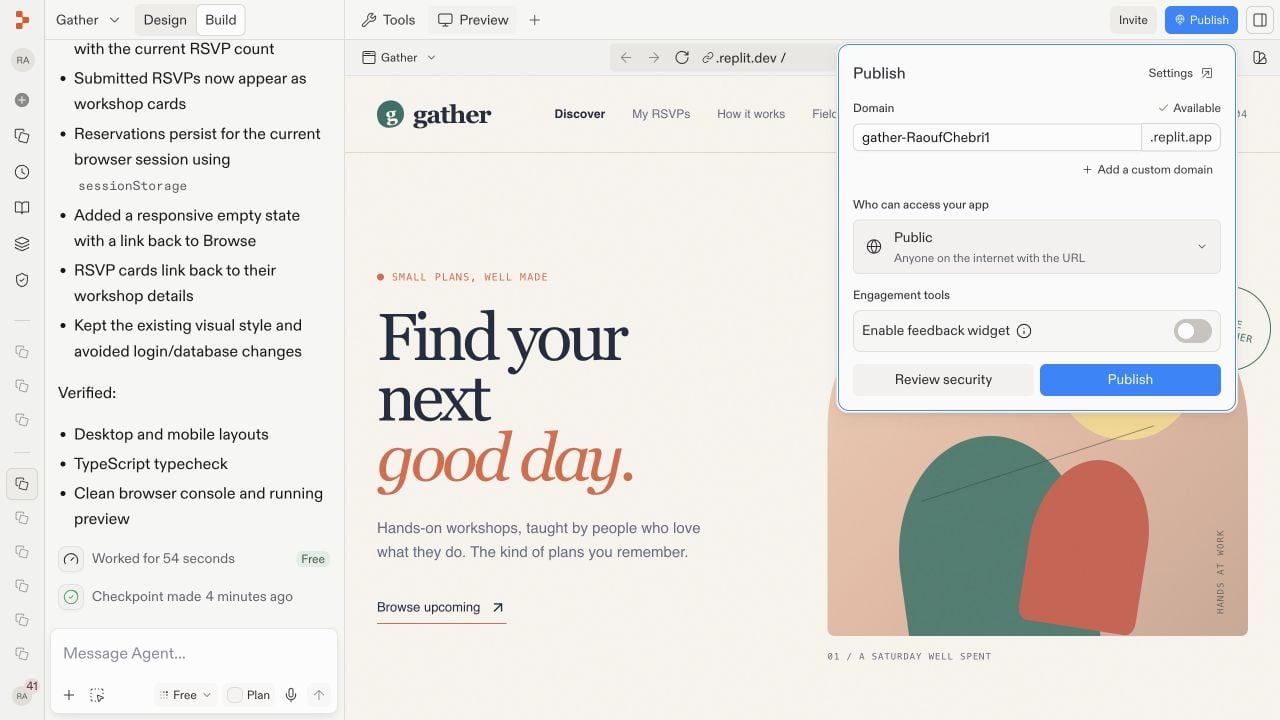
Official Replit documentation screenshot: the publishing dialog is a separate step from developing the app. Source: Replit’s Publish your app guide, checked November 13, 2026; not a Boost With AI test result.
Replit’s release documentation tells builders to open the public address after publishing and test the live app. Follow that advice even when the preview has behaved correctly.
3. Bolt: best for JavaScript projects with technical help
Bolt supports websites, web apps and mobile projects through Expo. Its documented technology boundary is specific: JavaScript-based browser interfaces and Node.js backends are supported, while Python and PHP backends are not.
You do not need to understand every language detail to make a sensible choice. If a colleague or developer will maintain the project, have them confirm that Bolt’s supported technologies fit the intended app before you invest in a build.
Where Bolt fits
A small team wants a stock-request tool that staff can open on a phone, while a technical collaborator handles connections to an existing system. Bolt belongs on the shortlist when that collaborator is comfortable maintaining the supported project structure.
Be precise about mobile requirements. A website that works on a phone and a mobile application distributed through an app store are different deliverables. Bolt documents Expo as its mobile-project route.
Bolt pros:
- Supports JavaScript-based web-app development in the browser.
- Includes built-in database creation and management through Bolt Cloud.
- Documents a route to Expo-compatible mobile projects.
Bolt cons:
- Python and PHP backends are outside its supported technologies.
- Some building features, including Code view and database management, are desktop-only.
Best for: Teams with a technical collaborator and a compatible JavaScript project.
Verdict: Choose Bolt when the technology fit is clear; skip it for a project that requires a Python or PHP backend inside the builder.
For a 2026 evaluation, decide where maintenance will happen as carefully as where the first screen will be generated. A convenient mobile chat experience does not mean every editing tool is available on a phone.
4. Bubble: best for visual workflow editing
Bubble combines AI app generation with visual development. Its current guide describes starting from a prompt, answering follow-up questions, reviewing a plan and refining the generated app in its editor.
Bubble’s distinct role here is the visual editing approach after generation. Shortlist it when you want to maintain business rules in a visual environment rather than mainly working through generated source code.
Where Bubble fits
Consider a service-request app with customers, staff and managers. A customer submits a request, staff update the work and a manager reviews exceptions.
Bubble’s planning guide separates features from scenarios written from a user’s perspective. That is a useful discipline: “staff can change a request’s status” is more testable than “include a staff dashboard.”
Bubble pros:
- Starts app creation from a plain-language description.
- Lets you review features and user scenarios before generation.
- Provides visual editing for continuing the build after the first version.
Bubble cons:
- Visual editing still requires you to learn the platform’s logic.
- Generated sample data can make a preview look complete before real-data behavior is tested.
Best for: Owners who want to maintain business workflows visually.
Verdict: Choose Bubble if you want to learn its visual development environment; wait if you expect the first prompt to remove ongoing maintenance.
Compare finalists with one useful business task
Do not ask every builder to create a different impressive demo. Give your finalists the same modest task and compare what happens when you change it.
For example, request an equipment-booking app with 3 roles: requester, approver and administrator. Use 2 test accounts to check that one requester cannot see another requester’s private information. Those are suggested evaluation inputs, not product limits or performance benchmarks.
Write down the expected behavior before generation:
- A requester saves a booking and sees it after signing in again.
- An approver changes its status and the requester sees the change.
- A second requester cannot open the first requester’s private record.
- An invalid date produces a clear message rather than a broken submission.
- The same flow works at the published address on a phone.
Then make a small change, such as adding a required reason for borrowing an item. Check whether existing records still work and whether the new requirement appears in both the staff and requester views.
The correction process tells you something the initial demo cannot: whether you can maintain the app without losing track of its rules.
How Boost With AI ranked these builders
This 2026 guide is an editorial comparison of documented capabilities, not a hands-on benchmark or a claim that every generated app is production-ready. Official Lovable, Replit, Bolt and Bubble documentation was checked on November 13, 2026.
The recommendations prioritize task fit, data handling, editing method and the path to a maintained live app. Affiliate links do not turn a product into a winner; Bolt and Bubble earn their places through different use cases.
Official sources
- Lovable: built-in backend and Supabase integration
- Replit: Agent capabilities and publishing a live app
- Bolt: supported technologies and platforms
- Bubble: generating apps with AI
Which AI app builder should you choose?
Boost With AI recommends starting with Lovable for a focused small-business web app. Choose Replit when a connected building and publishing workspace is the main requirement, Bolt when a technical collaborator wants its JavaScript-based approach, or Bubble when you want visual workflow editing.
Keep the first project narrow. A tool that reliably completes one customer or staff task is a better starting point than a large generated system nobody can confidently change.
For 2026, judge the result by saved data, correct permissions and a repeatable user journey. “The builder finished” is not the same as “the business process works.”
FAQ
What is the best AI app builder for a small-business owner?
Lovable is Boost With AI’s default first evaluation for a focused small-business web app. Replit, Bolt and Bubble fit different maintenance and publishing preferences.
Can an AI app builder create an app without coding?
These builders accept plain-language instructions, and Bubble also offers visual development. You still need to define the workflow and verify the result before customers use it.
Do I need Supabase to use Lovable?
No. Lovable documents a built-in backend that covers database, sign-in and storage. Connect your own Supabase project when you need direct management through that service.
Is Replit’s preview the same as a published app?
No. Replit separates the development preview from the production deployment used by visitors. Test the public version after publishing.
Can Bolt build mobile apps?
Bolt documents Expo-compatible mobile projects. Specify the intended mobile deliverable early rather than assuming a phone-friendly website is an app-store application.
Does Bubble still need editing after AI generation?
Yes. Bubble’s generated app is a starting version you can refine in the editor. Check the workflow with real test records rather than relying on generated sample data.
Which AI app builder is safest for customer data?
This comparison does not establish a security winner. Test account permissions, private-record access and the live app’s behavior, and get qualified review before storing sensitive information.
One last thing
Before inviting customers, sign in as the person with the least permission and try to open a record they should not see. A polished dashboard can hide a permission mistake; a deliberate access check makes it visible.
