
Best overall for creative marketing clips: Runway. Best for presenter-led explainers: Synthesia; best for video translation: HeyGen; best for Adobe-based creative workflows: Adobe Firefly; best for editing recorded content: Descript. This 2026 guide separates visual generation, avatar production, translation, and editing so you can choose the best AI video generator for the work you actually need done.
- Runway is the best AI video generator here for creative marketing clips, not presenter-led training.
- Synthesia suits scripted explainers; HeyGen suits translating presenter-led videos.
- Adobe Firefly fits Adobe-centered production; Descript fits editing recorded speech.
- Choose by finished deliverable, then compare source accuracy, editing effort, and usage terms.
Why this matters
An impressive generated scene is not necessarily a useful business video. A product demonstration needs accurate details; an onboarding lesson needs clear delivery; a translated sales introduction needs faithful meaning.
The right tool starts with that distinction. Boostwithai’s AI and marketing guides focus on choosing tools around business tasks rather than treating every generation feature as interchangeable.
For your 2026 shortlist, separate the production problem from the visual effect. Buy the workflow that produces your finished deliverable, not the demo that looks most impressive. A talking presenter, an atmospheric clip, and an edited customer interview require different production methods.
What makes the best AI video generator?
Use these criteria before comparing outputs. A tool that wins one category does not automatically win the others.
- Deliverable fit: Decide whether you need generated footage, a scripted presenter, translated speech, or edits to existing recordings.
- Subject accuracy: Check whether products, people, written text, and actions remain faithful to your brief.
- Revision control: Find out whether you can change a specific element without rebuilding everything around it.
- Production handoff: Check whether the result fits your editing, captioning, review, and publishing process.
- Permission and usage: Confirm consent for faces and voices, rights to source assets, and the terms governing your intended use.
- Review burden: Judge how much human correction stands between the first output and an approved video.
Do not treat cinematic appearance as a substitute for accuracy. For a business buyer, a plain video that explains the right thing beats a polished clip that misrepresents the offer.
Best AI video generators at a glance
These recommendations compare workflow fit, not benchmark scores. Each tool owns a different production job.
| Tool | Best for | Standout capability | Key limitation |
|---|---|---|---|
| Runway | Creative marketing clips | Text-to-video and image-to-video generation | Generated details need close inspection |
| Synthesia | Presenter-led explainers | Script-driven avatar video | Presenter delivery is not a product demonstration |
| HeyGen | Video translation | Translated speech with lip-sync tools | Language and identity checks remain necessary |
| Adobe Firefly | Adobe-based creative workflows | Generative video within the Adobe creative ecosystem | Generated footage still needs editorial assembly |
| Descript | Editing recorded content | Transcript-based audio and video editing | Not the default choice for cinematic scene generation |
The boundary between these tools matters more than their position in the table. If your starting asset is an interview recording, begin with editing. If your starting asset is a script, decide whether viewers need a presenter or a visual scene.
1. Runway: best AI video generator for creative marketing clips
Runway generates video from text prompts and source images. Choose it when you need visual material for a campaign, a concept film, or supporting footage rather than a presenter reading a business script.
Runway is the best AI video generator in this shortlist for marketers creating visual campaign clips. Its role is to help produce shots; your editing process still determines whether those shots communicate a clear message.
Where Runway fits
Suppose you are promoting a scheduling service. Instead of asking a generated character to explain every feature, create an abstract transition that suggests a crowded calendar becoming orderly, then add accurate product footage and your own messaging during editing.
Keep factual content outside the generated scene when accuracy matters. A real interface recording is a better source for demonstrating where a customer should click.
Runway pros:
- Supports both prompt-led creation and image-led animation.
- Fits visual concepts that do not require a talking presenter.
- Gives campaign editors generated material to combine with existing assets.
Runway cons:
- Generated products, movements, and fine details require inspection.
- A usable shot does not provide a complete script, edit, or campaign argument.
Best for: Marketers and creative teams producing visual supporting footage.
Verdict: Buy for creative clips; skip as your sole tool for factual product walkthroughs.
2. Synthesia: best AI video generator for presenter-led explainers
Synthesia creates avatar-led videos from scripts. It suits material where a presenter needs to deliver a structured explanation, such as onboarding instructions, internal training, or an introduction to a service.
Choose Synthesia when the spoken message carries the video. Do not choose it simply because a presenter looks more polished than a slide deck; the script still needs to teach something clearly.
Where Synthesia fits
For a customer onboarding lesson, write the explanation around a task: what the customer must do, what they should see, and what completion looks like. Pair the presenter with verified screenshots or recordings rather than asking the avatar format to stand in for evidence.
A useful script also distinguishes explanation from demonstration. Saying that a setting exists is not the same as showing how to configure it.
Synthesia pros:
- Turns written explanations into presenter-led video.
- Fits repeatable training and onboarding formats.
- Provides an alternative to filming a person for every scripted update.
Synthesia cons:
- An avatar cannot demonstrate physical product performance.
- Unclear scripts remain unclear after conversion into video.
Best for: Businesses producing structured, script-led explanations.
Verdict: Buy for repeatable presenter-led lessons; skip for footage-dependent demonstrations.
3. HeyGen: best AI video generator for video translation
HeyGen offers avatar creation and video translation, including lip-sync functionality. Its distinct role in this shortlist is adapting presenter-led content for another language.
Start with an approved source video. Translation should reproduce a settled message, not become another stage of rewriting an unfinished sales pitch.
Where HeyGen fits
Consider a service introduction recorded in English for an international audience. Use a translated version to carry the same explanation, then ask a fluent reviewer to check terminology, tone, names, and the call to action.
Lip movement is only one part of the review. A translation can look convincing while using the wrong industry term or making a stronger promise than the original speaker intended.
HeyGen pros:
- Combines presenter-video workflows with translation tools.
- Supports adapting an existing spoken message for another audience.
- Includes lip-sync functionality for translated video.
HeyGen cons:
- Translation requires review by someone who understands the target language.
- A translated face or voice requires appropriate permission and careful handling.
Best for: Teams localizing approved presenter-led business videos.
Verdict: Buy for reviewed video localization; skip unattended translation of sensitive claims.
4. Adobe Firefly: best AI video generator for Adobe-based production
Adobe Firefly includes generative video capabilities such as text-to-video and image-to-video. Its clearest fit is a creative process already organized around Adobe applications and assets.
Choose Adobe Firefly because it matches your production environment, not because sharing a vendor name removes the need to check output quality. Generated shots still need selection, assembly, and review.
Where Adobe Firefly fits
A designer preparing a campaign can use an approved image as a visual starting point, generate motion, and evaluate the result alongside the campaign’s other assets. The job is creating supporting material that an editor can use, not delegating the entire campaign.
If a recognizable product appears, compare its shape, markings, and behavior with the source. Image-led generation is not a guarantee that every identifying detail stays unchanged.
Adobe Firefly pros:
- Offers prompt-led and image-led video generation.
- Fits a workflow centered on Adobe creative tools.
- Supports creating visual material for subsequent editing and composition.
Adobe Firefly cons:
- Generated assets still require checks for factual and visual accuracy.
- An Adobe-centered workflow is less compelling when your team works elsewhere.
Best for: Designers and editors already using Adobe creative applications.
Verdict: Buy for an Adobe-based production process; hold if you only need a scripted presenter.
5. Descript: best video tool for editing recorded content
Descript edits audio and video through a transcript-based workflow. It belongs in this comparison because many businesses searching for an AI video generator actually need to turn existing recordings into clearer, shorter videos.
Choose Descript when your source is a webinar, interview, tutorial, or spoken recording. It is an editing-first recommendation, not a replacement for Runway-style visual scene generation.
Where Descript fits
Take a recorded customer interview and identify a passage that answers a specific buying question. Edit for clarity, check the result against the original meaning, and add the context a viewer needs to understand the excerpt.
Do not remove qualifications just to make a testimonial sound stronger. An efficient editing workflow does not change your responsibility to represent the speaker accurately.
Descript pros:
- Makes spoken content editable through its transcript.
- Fits repurposing recordings into focused business videos.
- Keeps production anchored to material you already recorded.
Descript cons:
- Does not fill the same role as a dedicated cinematic video generator.
- Transcript edits need playback checks to preserve natural delivery and meaning.
Best for: Owners and marketers editing interviews, tutorials, and webinars.
Verdict: Buy for recorded-content editing; skip if your main requirement is generating visual scenes.
How to compare your finalists before committing
For a 2026 evaluation, use a real deliverable rather than an open-ended prompt. A fair comparison gives tools the same business objective while allowing different production methods.
Prepare a 30-second brief, a 15-second excerpt, and 3 approved source assets. These are suggested evaluation inputs, not performance benchmarks. For an explainer, the assets might be a logo, a verified screenshot, and an approved script.
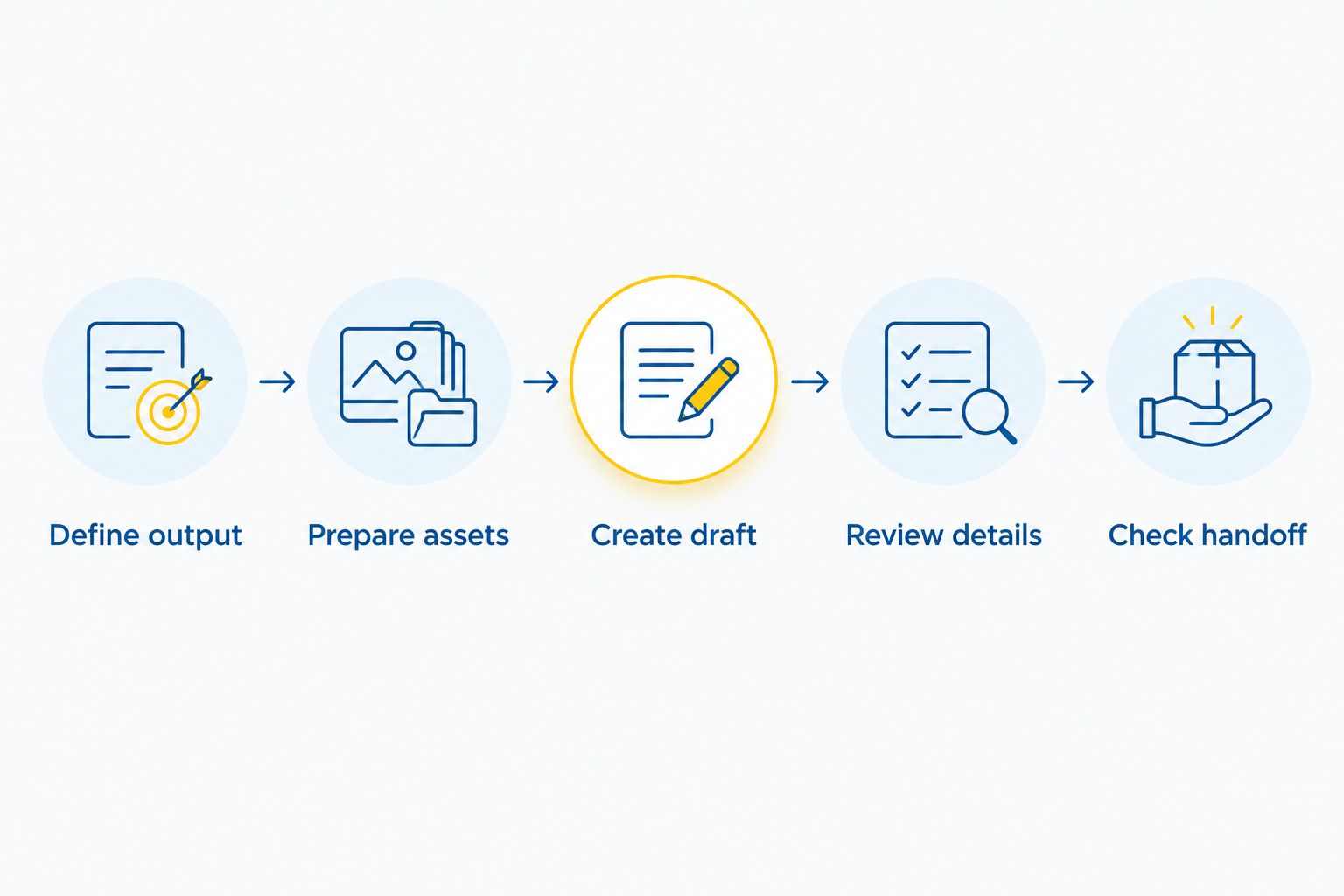
Follow this sequence:
- Define output: State the audience, channel, message, and required format.
- Prepare assets: Gather approved text, images, recordings, and permissions.
- Create draft: Produce a version that answers the brief without adding unsupported claims.
- Review details: Check visuals, speech, captions, pronunciation, and meaning.
- Check handoff: Confirm that the result can enter your normal approval and publishing process.
Record correction effort alongside visual quality. If a clip looks good but requires repeated factual repairs, that burden belongs in your decision.
How the ranking works
Boostwithai’s best AI video generator ranking for 2026 prioritizes deliverable fit, subject accuracy, revision control, production handoff, permissions, and review burden. The order reflects the use cases described here, not an overall quality score.
This is an editorial workflow comparison, not a report of hands-on benchmark results. Before subscribing, verify current features, export conditions, usage terms, and account requirements in each provider’s official documentation.
Which AI video generator should you choose?
Choose Runway if you need creative visual clips and have an editing process to finish them. Choose Synthesia for scripted presenter explanations, HeyGen for reviewed video translation, Adobe Firefly for Adobe-based creative production, and Descript for recorded-content editing.
For an undecided small-business owner, the default is the tool closest to the source material you already have. A useful recording points toward Descript; an approved teaching script points toward Synthesia; a visual campaign brief points toward Runway.
Boostwithai’s recommendation for the best AI video generator is therefore task-specific: choose the production method before comparing individual outputs. That is the practical buying rule for 2026.
FAQ
What is the best AI video generator for a small business?
Runway is the default recommendation here for creative marketing clips. Choose Synthesia for presenter-led explainers or Descript when your main task is editing existing recordings.
Is Runway better than Synthesia?
Runway is better suited to generated visual scenes, while Synthesia is better suited to script-driven presenter videos. Compare them only after deciding which format your audience needs.
Which tool should I use to translate a business video?
HeyGen is the translation-focused recommendation in this shortlist. Have a fluent reviewer check the translated meaning, terminology, and call to action before publishing.
Can an AI video generator make an accurate product demonstration?
Use real product footage or screen recordings when the demonstration must show exact behavior. Generated footage needs inspection and should not serve as evidence of a feature or result.
Should I use Adobe Firefly if I already use Adobe tools?
Adobe Firefly belongs on your shortlist when your production process already centers on Adobe applications. Evaluate its output against your actual brief rather than choosing solely on vendor familiarity.
Do I need a video generator to edit a webinar?
No, an editing-first tool such as Descript is the closer fit for a recorded webinar. Start with the existing recording and preserve the speaker’s meaning while shortening it.
Can I use generated faces and voices in marketing?
Use faces and voices only with the necessary permissions and in line with applicable rules and provider terms. Do not assume that access to a generation feature grants permission to imitate a person or imply their endorsement.
One last thing
Ask someone unfamiliar with your business to watch the draft without an explanation from you. Then ask what the offer does and what action they should take.
If the answers are wrong, fix the message before regenerating the visuals. A more convincing picture will not correct a confusing argument.
Related guides
