
TL;DR – Key Takeaways
- ChatGPT is the best all-round AI tool for students, with a capable free tier
- Anara is the top pick for research papers – it writes with every claim automatically cited
- NotebookLM turns your lecture notes and readings into a podcast you can listen to while commuting
- GitHub Copilot is completely free for verified students through the GitHub Student Developer Pack
- Wolfram Alpha has a dedicated student plan at $5.99/month – essential for maths and science
- Every tool in this list has a free tier or a free trial – no payment required to start
- Tested in June 2026 across five common student tasks
What should students look for in an AI tool?
The best AI tools for students are free to start, easy to use without technical knowledge, and genuinely save time on the tasks students do most: writing drafts, summarising readings, taking notes, and revising for exams.
Three criteria shaped every recommendation in this list.
1. Free tier availability. Students should not have to pay to get real value. Every tool below works meaningfully on its free plan. Paid options are noted where the upgrade is genuinely worth it for a typical student workload.
2. Ease of use for non-technical users. If a tool requires setup, a command line, or a technical background to unlock its main features, it is not on this list. Everything here works from a browser or a phone, usually within seconds of signing up.
3. Practical value for real student tasks. This list focuses on the five tasks students actually need help with: writing, studying, note-taking, coding, and presentations. Not image generators or music tools – the things that matter at 11pm the night before a deadline.
Quick stat: AI-referred web sessions jumped 527% year-over-year in the first five months of 2025, which means the tools in this list are developing and improving faster than ever. Always check the free tier limits directly, as these change frequently.
Best AI tools for writing essays and assignments
ChatGPT is the best AI writing tool for students because it drafts, edits, and rewrites content on demand, with a free tier that covers most student needs without requiring a paid plan.
Here are the three tools worth knowing for writing tasks:
| Tool | Free tier | Best for |
|---|---|---|
| ChatGPT | Yes (GPT-4o mini) | Drafting, brainstorming, rewriting |
| Claude | Yes (limited daily messages) | Essay feedback, nuanced editing |
| Grammarly | Yes (core features) | Proofreading, grammar, tone checks |
ChatGPT is the default starting point for most student writing tasks. Ask it to draft an introduction, rewrite a confusing paragraph, or brainstorm three different angles for your argument. The free tier uses GPT-4o mini, which is more than capable for everyday writing help.
Claude works best alongside ChatGPT for feedback rather than generation. Paste in a draft and ask Claude to identify weak arguments, suggest a clearer structure, or simplify overly complicated sentences. Claude tends to give more balanced, nuanced editorial feedback – especially useful for academic writing that requires careful reasoning rather than just fluent prose.
Grammarly remains the most reliable free proofreading tool. It integrates directly into Google Docs, Microsoft Word, and most browsers, so there is no need to copy-paste anything. The free tier catches grammar errors, spelling mistakes, and tone issues that most students miss when proofreading their own work.
Before/after: improving an essay introduction with ChatGPT
Original (vague): “This essay will discuss the effects of social media on mental health and look at different research to draw conclusions about the topic.”
ChatGPT prompt used: “Rewrite this essay introduction to be more specific and engaging. State the argument clearly in the first sentence.”
Improved: “Heavy social media use – more than three hours daily – is linked to a 27% higher risk of depression in teenagers, according to a 2023 JAMA study. This essay argues that platform design, not individual behaviour, is the primary driver of this risk.”
For more prompts like this, the how to write better AI prompts guide on this site walks through the exact method step by step.
A note on academic integrity
AI is a drafting aid, not a ghostwriter. Submitting AI-generated text as your own work is academic dishonesty at most institutions – and it defeats the purpose of the assignment. Use AI to help you think, plan, structure, and edit. The ideas and the final writing should remain yours. Always check your institution’s specific policy before using any AI tool for assessed work.
Best AI tools for studying and understanding complex topics
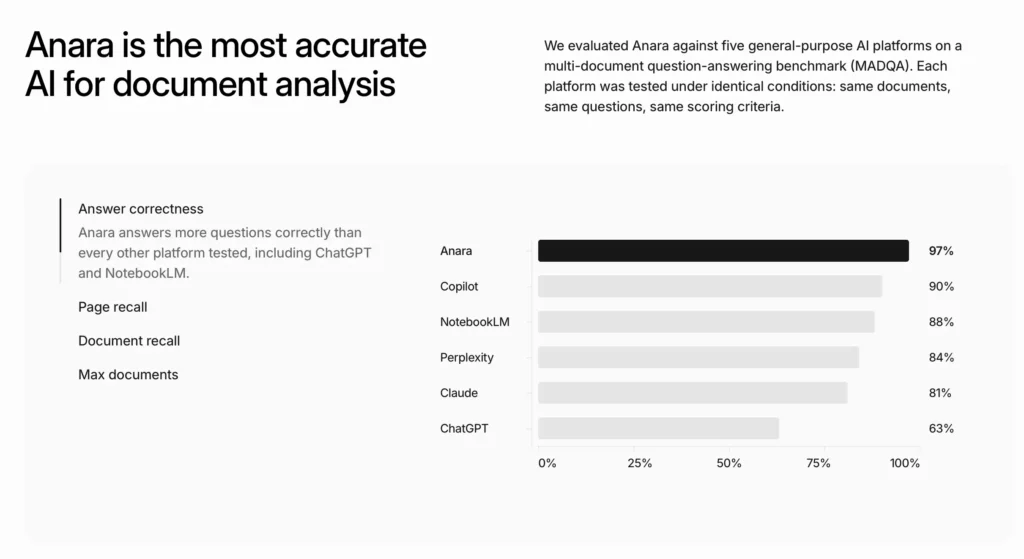
Anara is the best AI tool for academic research because it searches your uploaded documents and the web simultaneously, then writes responses with every claim automatically cited back to its source – making it significantly more accurate than general-purpose AI for research tasks.
Here are the three tools that work best for studying:
| Tool | Free tier | Best for |
|---|---|---|
| Anara | Yes | Research papers, literature reviews, cited writing |
| Claude | Yes | Summarising long documents, Q&A on any reading |
| NotebookLM | Yes (Google account) | Podcast-style audio summaries, source-grounded Q&A |
Anara is built specifically for students and researchers who need accurate, cited answers. You upload your PDFs, journal articles, and lecture notes – or search the web – and Anara references all of them to generate answers with inline citations you can verify. According to Anara, it is 4x more accurate than general AI for research tasks. This makes it particularly valuable for literature reviews, research essays, and any assignment where citing sources correctly matters. Try it free at anara.com.
Claude handles extremely long documents – up to 200,000 words in a single conversation – which makes it the go-to tool for uploading a full textbook chapter, a 40-page research paper, or an entire semester of lecture notes and then asking questions directly. A prompt that works well: “Generate five exam questions from this document based on the key concepts.”
Tested: Uploading 30 pages of lecture notes into Claude and asking it to create a structured summary table plus five practice exam questions took under two minutes. The questions matched the key concepts accurately without any manual editing.
NotebookLM: turn your notes into a podcast for studying on the go
NotebookLM (Google, free) is one of the most genuinely useful things AI has produced for students – and most people have not heard of it yet.
You add your own sources – PDFs, Google Docs, websites, YouTube videos – and NotebookLM builds a locked knowledge base from them. Everything it tells you is grounded in your sources, not the open internet. That means no hallucinated references or made-up facts – only information from the documents you uploaded.
The standout feature is the Audio Overview. NotebookLM converts your uploaded sources into a two-person podcast-style conversation that walks through the key ideas, debates, and concepts in your material. Upload 60 pages of revision notes, press generate, and within a few minutes you have a 10-15 minute audio summary ready to listen to.
This is where it becomes genuinely powerful for students: you can study during a commute, a walk to campus, a gym session, or any time reading a screen is not practical. Students who learn better through listening than reading – or who want to make use of dead time in their day – will find this feature transformative.
A practical workflow that works well:
- Upload your lecture slides or reading PDFs to NotebookLM at the start of each week
- Generate an Audio Overview for each topic
- Listen on the commute or during other low-attention activities
- Return to the notebook to ask follow-up questions on anything you want to understand more deeply
NotebookLM is completely free with any Google account. There are no paid tiers at time of writing.
Quick stat: Research published in Psychological Science (Karpicke and Roediger, 2008) found that active recall practice – generating questions and testing yourself – can improve test scores by up to 50% compared to passive re-reading. NotebookLM supports this by letting you ask your own material questions directly, not just listen passively.
Best AI tools for note-taking and staying organised
Notion AI is the best AI tool for student organisation because it combines note-taking, task management, and AI-assisted writing in one free workspace that syncs across all devices.
| Tool | Free tier | Best for |
|---|---|---|
| Notion AI | Yes (limited AI queries) | Notes, to-do lists, project planning |
| Google Gemini | Yes | Notes inside Google Docs, meeting summaries |
| Otter.ai | Yes (300 minutes/month) | Transcribing lectures automatically |
Notion AI is the most flexible option for students who want to keep everything in one place. Use it to take notes, build a semester planner, track assignment deadlines, and then ask the AI to convert bullet-point notes into a structured study guide. The free personal plan covers most student needs; the AI add-on is $8/month for unlimited AI queries.
Practical tip: After a lecture, paste your raw notes into Notion and use this prompt: “Convert these bullet points into a structured study guide with clear headings and a summary section at the top.” It turns messy notes into a revision-ready document in about 10 seconds.
Google Gemini is worth using if you are already living inside Google Docs. It summarises long documents, drafts notes in your writing style, and creates action items from meeting transcripts – all without leaving the Google workspace most students already use daily.
Otter.ai transcribes lectures in real time and produces a searchable text version of everything said. The free tier gives 300 minutes of transcription per month – roughly six standard 50-minute lectures. Students who record a lot of sessions will find the paid plan worthwhile.
Best AI tools for coding and STEM subjects
GitHub Copilot is the best AI coding tool for students, and it is free for verified students through the GitHub Student Developer Pack, giving full access to the paid version at no cost.
| Tool | Free tier | Best for |
|---|---|---|
| GitHub Copilot | Free for students | Writing and debugging code in any language |
| ChatGPT | Yes | Explaining coding concepts, fixing errors |
| Cursor | Yes (free tier) | Beginner-friendly AI code editor |
| Wolfram Alpha | Student plan ($5.99/month) | Maths, physics, chemistry, step-by-step solutions |
GitHub Copilot is included in the GitHub Student Developer Pack – free for any student with a verified academic email address. It autocompletes code as you type, explains what any block of code does, and suggests fixes for errors. For students learning their first programming language, this is one of the best free resources available anywhere.
ChatGPT remains the most useful tool for understanding why something in your code is broken. Paste the error message and ask: “Explain what this Python error means and show me how to fix it.” It explains the problem in plain language rather than just silently fixing it, which actually helps you learn the underlying concept.
Cursor is a code editor with AI built directly into the interface – similar to VS Code but with AI suggestions, explanations, and debugging built in. The free tier is a good starting point for students who find GitHub Copilot’s setup slightly complicated.
Wolfram Alpha earns a mention for STEM students outside of coding. It solves maths problems step by step, handles calculus, statistics, chemistry equations, and physics formulas, and shows its working – far more useful for learning than just getting a final answer. The standard free tier covers many queries; the Pro Student plan at $5.99/month unlocks step-by-step solutions and extended computation. Verification with a student email is required.
For a deeper guide to using AI for coding as a complete beginner, the Vibe Coding section on boostwithai.se covers this in detail – including how to go from zero to building your first working project with AI assistance, no prior experience needed.
Best AI tools for presentations and visual work
Canva AI is the best free AI tool for student presentations because it generates slide layouts, rewrites text for clarity, and creates images from simple descriptions – all inside a tool most students already know.
| Tool | Free tier | Best for |
|---|---|---|
| Canva AI | Yes | Slide design, image generation, visual layouts |
| Gamma | Yes (limited exports) | AI-generated presentations from a text prompt |
| ChatGPT | Yes | Writing speaker notes, structuring slide content |
Canva AI has become the default presentation tool for most students – and for good reason. The free tier is generous, the templates are professional, and the AI features (Magic Write, text-to-image, background remover) are accessible without any design knowledge. For group projects, real-time collaboration is built in.
Gamma is the most impressive option if you want to skip design work entirely. Type a topic – “A 6-slide presentation on the causes of the 2008 financial crisis for a first-year economics class” – and Gamma generates a complete, styled presentation in under a minute. The free tier limits exports but works fine for class submissions viewed in the browser.
ChatGPT tip – start here before opening any slide tool: Use ChatGPT to plan the structure first: “Give me a 6-slide outline for a presentation on [topic] for [audience]. Include a hook for slide 1 and three bullet points per slide.” Copy the output directly into Canva or Gamma. This single step saves 20-30 minutes of staring at a blank first slide.
Quick comparison: all tools at a glance
The best free AI tools for students cover five main tasks: ChatGPT for writing, Anara for research with citations, NotebookLM for audio study on the go, GitHub Copilot for coding, and Canva AI for presentations.
| Tool | Best for | Free tier | Paid plan starts |
|---|---|---|---|
| ChatGPT | Writing, brainstorming, explaining | Yes | $20/month |
| Claude | Long documents, essay feedback | Yes | $20/month |
| Grammarly | Proofreading, grammar | Yes | $12/month |
| Anara | Research papers, cited writing | Yes | See pricing |
| NotebookLM | Audio summaries, source Q&A | Yes | Free |
| Notion AI | Notes, organisation | Yes | $10/month |
| Otter.ai | Lecture transcription | Yes | $16.99/month |
| GitHub Copilot | Coding | Free for students | $10/month |
| Wolfram Alpha | Maths and science | Yes (limited) | $5.99/month (student) |
| Canva AI | Presentations, visuals | Yes | $15/month |
| Gamma | AI-built presentations | Yes | $10/month |
Frequently asked questions
Are AI tools allowed in school and university?
It depends on your institution’s policy, which varies significantly by course and assignment type. Many universities now allow AI for research, drafting, and editing but prohibit submitting AI-generated work as your own. Always check your course guidelines before using any AI tool for assessed work.
What is the best free AI tool for writing essays?
ChatGPT’s free tier is the most capable free AI writing tool for students. It drafts, rewrites, and gives feedback on request. For proofreading specifically, Grammarly’s free tier is more focused and integrates directly into the word processors students already use.
What is the best AI tool for research papers with proper citations?
Anara is purpose-built for this. It searches your uploaded documents and the web, then writes with every claim automatically cited back to its source. This makes it significantly more reliable for academic work than general-purpose AI tools that can hallucinate references. You can try it on the free tier at anara.com.
Can I study by listening instead of reading with AI tools?
Yes – NotebookLM’s Audio Overview feature does exactly this. Upload your lecture notes, readings, or revision PDFs and it generates a podcast-style conversation between two AI hosts discussing the key concepts in your material. The audio runs 10-20 minutes depending on your sources and is ideal for studying during a commute, a walk, or any time reading a screen is not practical. It is completely free with any Google account.
Can AI tools help with exam revision?
Yes, and this is one of the most underused student applications. Upload your notes to Claude or NotebookLM and ask it to generate practice questions, create a summary table of key concepts, or quiz you on the material. Research in Psychological Science found that active recall practice can improve test scores by up to 50% compared to passive re-reading – and AI makes generating those practice questions effortless.
Is GitHub Copilot really free for students?
Yes. GitHub Copilot is included in the GitHub Student Developer Pack, which is free for any student with a verified academic email address. It gives access to the full paid version of Copilot plus dozens of other developer tools at no cost.
Will AI tools write my essays for me?
They can produce text on any topic, but submitting AI-generated content as your own work is academic dishonesty at most institutions and defeats the purpose of the assignment. The most effective student use is using AI to help you think, plan, and edit – while the ideas and final writing remain your own.
