

Market research has traditionally required hours of tab-switching, manual note-taking, and cross-referencing multiple sources. You open 20 tabs comparing competitor pricing, reading industry reports, and sifting through customer reviews, only to spend another two hours organizing everything into a coherent analysis. Comet, Perplexity’s AI-powered browser, eliminates this friction. Instead of searching, you think out loud. Instead of manually consolidating data, Comet executes complete research workflows while maintaining perfect context.
This guide shows you exactly how to leverage Comet for professional-grade market research, saving hours per week while uncovering deeper competitive insights.
What is Comet and Why It’s a Game-Changer for Market Research
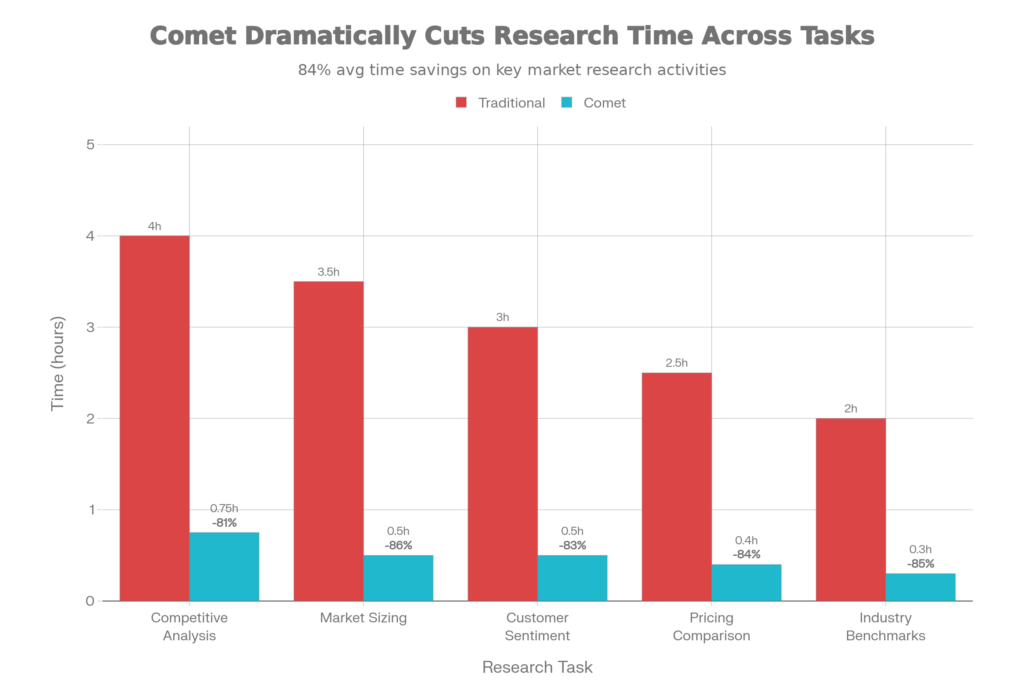
Comet is a Chromium-based AI browser that integrates Perplexity’s conversational search engine with a powerful agent that can read, navigate, and act on web content. Unlike traditional browsers that simply display information, or search engines that return links, Comet synthesizes real-time web data into structured, actionable intelligence.
For market researchers, this matters because:
- Speed: Get comprehensive competitive analysis in minutes instead of hours
- Accuracy: Comet cites every source, so you can verify findings and drill deeper
- Context awareness: The browser remembers what you’re researching and surfaces relevant information without constant re-prompting
- Automation: Set up workflows that run automatically, gathering data while you focus on analysis and strategy
The fundamental difference: traditional tools make you find information. Comet makes the information find you.
How Comet Differs from Traditional Research Tools
Comet vs. Google Search
Google gives you links; Comet gives you answers. When you search Google for “market size of AI-powered CRM tools,” you get 10 blue links pointing to blog posts, industry reports, and opinion pieces. You then spend 30 minutes reading through each one, copy-pasting statistics into a spreadsheet.
With Comet, you ask the same question in natural language, and it browses the web in real-time, reads multiple sources, and returns a synthesized answer with citations. You get the critical data in seconds, with sources linked so you can drill deeper if needed.
Comet vs. ChatGPT
ChatGPT excels at creative writing and brainstorming, but its training data has a knowledge cutoff. If you ask ChatGPT about Q4 2025 SaaS market trends, it can’t access real-time data. Comet, powered by live web search, gives you current market conditions, recent funding announcements, and emerging competitor moves.
Additionally, ChatGPT’s “hallucinations”—plausible-sounding but false information—can be dangerous in market research. Comet’s citations allow you to verify every claim.
Comet vs. Perplexity Web
Perplexity’s web interface is excellent, but it requires you to manually switch between your research tool and other apps. Comet is integrated directly into your browser, meaning you can browse a competitor’s website, highlight a section, and immediately ask the Comet Assistant questions about it—all without leaving the tab. This contextual awareness dramatically speeds up analysis.
Step-by-Step Guide: Using Comet for Market Research
Workflow 1: Competitive Analysis
Objective: Gather comprehensive intel on three key competitors.
Time investment: 45 minutes (vs. 3-4 hours manually)
Step 1: Launch Comet and Define Your Research Question
Open Comet and ask a structured question:
“Analyze the top 3 competitors in the AI-powered CRM market. For each competitor, provide: (1) company description and founding year, (2) primary product features, (3) pricing model, (4) recent funding or news, (5) estimated market position, (6) key differentiators.”
Comet immediately scours the web, aggregates data from company websites, funding databases, news sources, and industry reports.
Step 2: Review and Organize Findings
Comet returns a structured response with citations. You get a comparison table showing each competitor’s positioning, pricing, and key features—all with clickable sources.
Step 3: Drill Deeper with Follow-Up Questions
Ask targeted follow-ups:
- “What customer pain points does [Competitor A] claim to solve? Extract specific language from their website.”
- “Find recent customer reviews or case studies for [Competitor B] on G2 or Capterra. What are the most common complaints?”
- “Has [Competitor C] announced any product updates or partnerships in the last 90 days?”
Each question returns synthesized data with sources, building a comprehensive competitive dossier.
Step 4: Export and Structure
Use Comet’s export feature to download findings as structured data. Paste directly into your competitive analysis document or spreadsheet.
Workflow 2: Market Sizing and Trend Analysis
Objective: Understand market size, growth rate, and emerging trends.
Ask Comet:
“What is the current market size of [industry]? Provide: (1) 2024 market size in USD, (2) projected 2025-2030 CAGR, (3) key growth drivers, (4) regional breakdown (US, EU, APAC), (5) sources for each data point.”
Comet aggregates data from Gartner, Forrester, IDC, LinkedIn, and industry-specific reports, returning citations so you can trace findings back to authoritative sources.
Follow-up questions:
- “Which emerging technologies or trends are driving growth in [industry]?”
- “What are analyst predictions for [industry] in 2026?”
- “Who are the fastest-growing startups in [industry], and what are they focusing on?”
Workflow 3: Customer Research and Sentiment Analysis
Objective: Understand customer needs, pain points, and sentiment toward competitors.
Ask Comet:
“Analyze customer sentiment toward [product/company]. Source from: Reddit discussions, G2/Capterra reviews, Twitter/X mentions, and industry forums. Summarize: (1) top 5 praised features, (2) top 5 complaints, (3) NPS-style sentiment (positive/neutral/negative ratio), (4) emerging feature requests.”
Comet scans public data sources and returns synthesis with citations. You immediately know what customers love and what frustrates them—critical intelligence for product positioning.
Workflow 4: Industry Benchmarking
Objective: Compare your metrics against industry standards.
Ask Comet:
“What are industry benchmarks for [metric] in [industry]? Provide: (1) average, (2) top 25% percentile, (3) bottom 25% percentile, (4) growth benchmarks year-over-year, (5) how this varies by company size/region.”
Instantly know whether your customer acquisition cost, churn rate, or contract value is competitive.
Real-World Use Cases
Case Study 1: E-Commerce Competitive Research
A D2C brand wanted to understand the market opportunity for a new product category. Instead of manually visiting 15 competitor websites and industry reports, they used Comet to:
- Map the competitive landscape (10 major players identified in 2 minutes)
- Extract pricing and positioning from competitor websites (5 minutes)
- Analyze customer reviews on Trustpilot and G2 (5 minutes)
- Research recent funding announcements and growth signals (3 minutes)
Total time: 25 minutes vs. estimated 4 hours manually.
Result: They discovered an underserved customer segment that competitors hadn’t targeted, providing directional input for their product roadmap.
Case Study 2: SaaS Market Entry Analysis
A B2B SaaS company considering a new market used Comet to:
- Size the addressable market and growth trajectory
- Identify top 5 incumbent solutions and their weaknesses
- Extract customer pain points from forum discussions and review sites
- Assess competitive pricing and packaging strategies
- Find analyst reports on market trends
Instead of a 2-week research project, they had comprehensive market intelligence in a single working day.
Advanced Comet Techniques for Power Users
Create Workflow Shortcuts
Comet allows you to save frequently-used research prompts as shortcuts. For example, create a “Competitive Benchmark” shortcut that:
- Analyzes pricing strategies across 5 competitors
- Extracts feature comparisons
- Formats findings into a table
Then, every quarter, trigger the shortcut with a single click to automatically refresh competitive intel.
Multi-Step Research Pipelines
Break large research projects into phases:
- Phase 1: Use a simpler prompt to gather baseline data (companies, market size, key trends)
- Phase 2: Deep dive with follow-up questions targeting gaps identified in Phase 1
- Phase 3: Synthesis and export into structured formats
This iterative approach ensures comprehensive, verified findings.
Integration with External Tools
Use Comet alongside tools like:
- Airtable: Export research data directly into structured databases
- Notion: Clip research findings and automatically organize by category
- Google Sheets: Create comparison matrices with data from Comet’s research
Tips to Get the Best Results from Comet Market Research
1. Use Structured Prompts
Instead of: “Tell me about my competitors.”
Use: “Provide a detailed analysis of [3 specific competitors] including: (1) company founding and leadership, (2) primary revenue model, (3) customer base size estimate, (4) recent product launches, (5) pricing tiers, with sources for each.”
Structured prompts yield organized, actionable responses.
2. Verify Critical Claims
While Comet’s citations are reliable, always click through to source material for mission-critical claims (e.g., market size estimates used in your business plan). Cross-reference findings across multiple sources.
3. Organize Findings Systematically
Use Comet’s built-in annotation and tagging features to organize research by category: pricing, features, customer sentiment, market trends. This makes synthesis and reporting faster.
4. Leverage Context Awareness
Once you’ve started researching a topic, Comet remembers the context. Follow-up questions are automatically scoped to your initial research question, reducing the need for constant re-prompting.
5. Schedule Regular Updates
Market data ages quickly. Set a recurring calendar reminder to refresh key research (competitive pricing, funding announcements, customer sentiment) quarterly or semi-annually.
Frequently Asked Questions
Q: Is Comet’s market research data accurate?
A: Comet’s strength is synthesizing publicly available information with citations. For critical decisions, always verify findings by reviewing source material directly.
Q: Can Comet access paywalled reports (Gartner, Forrester)?
A: Not directly, but Comet can find publicly available summaries, press releases, and analyst commentary about these reports.
Q: How does Comet handle real-time data vs. historical trends?
A: Comet accesses live web data, making it excellent for current pricing, recent announcements, and emerging trends. For historical analysis, combine Comet findings with archived data.
Q: Can I export Comet research findings?
A: Yes. You can copy-paste findings, use export features to download structured data, or integrate with tools like Airtable and Notion.
Q: Is Comet better for market research than traditional tools like Similarweb or Crunchbase?
A: Different tools for different purposes. Comet excels at synthesizing qualitative insights and current trends. Dedicated tools like Similarweb (web traffic) and Crunchbase (funding data) provide deeper metrics in their specific domains. Use Comet for broad research and these specialized tools for deep-dive metrics.
Conclusion: Transform Your Market Research Workflow
Comet shifts market research from a time-consuming, manual process to a rapid, automated workflow. Whether you’re analyzing competitors, sizing markets, understanding customer sentiment, or benchmarking against industry standards, Comet delivers research-grade insights in a fraction of traditional time.
The competitive advantage isn’t just speed—it’s freshness. Comet’s real-time web access means your market intelligence is always current, enabling faster strategic decisions.
Ready to accelerate your market research? Download Comet today (free for all users) and run your first competitive analysis. Start with a single research question and expand from there.
This article references Comet’s powerful capabilities. For additional uses, explore our guide on 5 Incredible AI Browsers to 10x Your Productivity and learn how Comet compares to other research tools in our Perplexity vs ChatGPT comparison.
